Hyperautomation means automating a business from end to end: customer service, jobs, invoices, reviews and the daily summary, all connected, with a person supervising. This guide explains where the term comes from, what its components are, how a complete system is designed and why almost every module suits any business.
- What hyperautomation is
- Hyperautomation and automation: how they differ
- The components of hyperautomation
- A full example: a day at a shutter company
- One brain, many channels
- Universal modules and trade-specific modules
- Advantages and disadvantages of hyperautomation
- What not to automate
- How to start with one module
- Frequently asked questions about hyperautomation
- Sources
What hyperautomation is
Hyperautomation is the coordinated automation of as many of a company's processes as possible, combining several technologies (programs connected to one another, artificial intelligence, business rules) in a single system. Each piece relies on the others: what a customer says on WhatsApp reaches the technician, the job sheet, the invoice and the owner's summary without anyone copying it by hand.
The term was brought into circulation by the consultancy Gartner, which describes it as a disciplined, business-driven approach to identifying, vetting and automating as many business and IT processes as possible, using several tools in concert. In October 2019 Gartner included it among its top ten strategic technology trends for 2020, and even then it warned that a robot that repeats clicks (RPA) is not, on its own, hyperautomation.
There are three ideas in that definition:
- It runs from end to end: from the moment a request comes in until it is paid and the customer is asked for their opinion.
- It combines several technologies, because none is enough alone: connections between programs, fixed rules and AI models that understand natural language.
- It follows a method: you measure the starting point, choose where to begin and review what has been done.
A small business rarely asks for "hyperautomation". It asks for no missed calls out of hours, for nobody to have to type up job sheets by hand and for the invoice to go out the same day. If those three things are solved together and with the same data, that is already business hyperautomation, even if nobody calls it that.
It exists so that repetitive work stops depending on someone remembering. Anyone who wants to automate a company with AI needs both halves: the AI, which serves the customer and understands what they ask for, and the rest of the system, which gets that request to the person who has to act on it.
Hyperautomation and automation: how they differ
Automating a task means getting a program to do one specific step: copying the data from a form into a spreadsheet, sending a reminder. Process hyperautomation connects all those steps, so that the result of one feeds the next and the whole business runs as a system.
| Automating separate tasks | Hyperautomation | |
|---|---|---|
| Scope | One step: an email, a form, an alert | The whole journey, from the request to payment and the customer's opinion |
| Data | Each tool keeps its own and someone moves it from one to another | A single data core used by every piece |
| What happens with the unexpected | The automation fails or stalls | The AI interprets the case and, if it falls outside the rules, hands it to a person |
| Who sees it | Each person sees their own part | A dashboard and a daily summary show the whole business |
In day-to-day use, the data core is what you notice most. If every automation keeps its own copy of customers, jobs and rates, sooner or later the copies stop matching. To begin with specific processes, our page on AI automation for SMEs explains how we do it task by task.
The components of hyperautomation
Software vendors' guides talk about RPA, artificial intelligence, machine learning, process management and process mining, low-code and integration platforms. In a small business, all of that boils down to six layers.
- Input channelsWhere requests arrive: phone, WhatsApp, web, email, forms.
- Conversational artificial intelligenceAn assistant that understands what the customer says, asks the necessary questions and leaves the job properly recorded.
- Data core and rulesCustomers, jobs, rates, areas, employees, VAT and commission rules. This is where the business logic lives.
- IntegrationsConnections to the programs the company already uses: invoicing, diary, email, spreadsheets, Google.
- Workflow automationsWhat starts when something happens: alerts, reminders, generated documents, payments marked as received.
- Dashboard and supervisionWhere a person sees what has happened, approves anything doubtful and makes corrections.
The integration, workflow and dashboard layers change little from one business to another, which is why almost all of the system can be reused.
A full example: a day at a shutter company
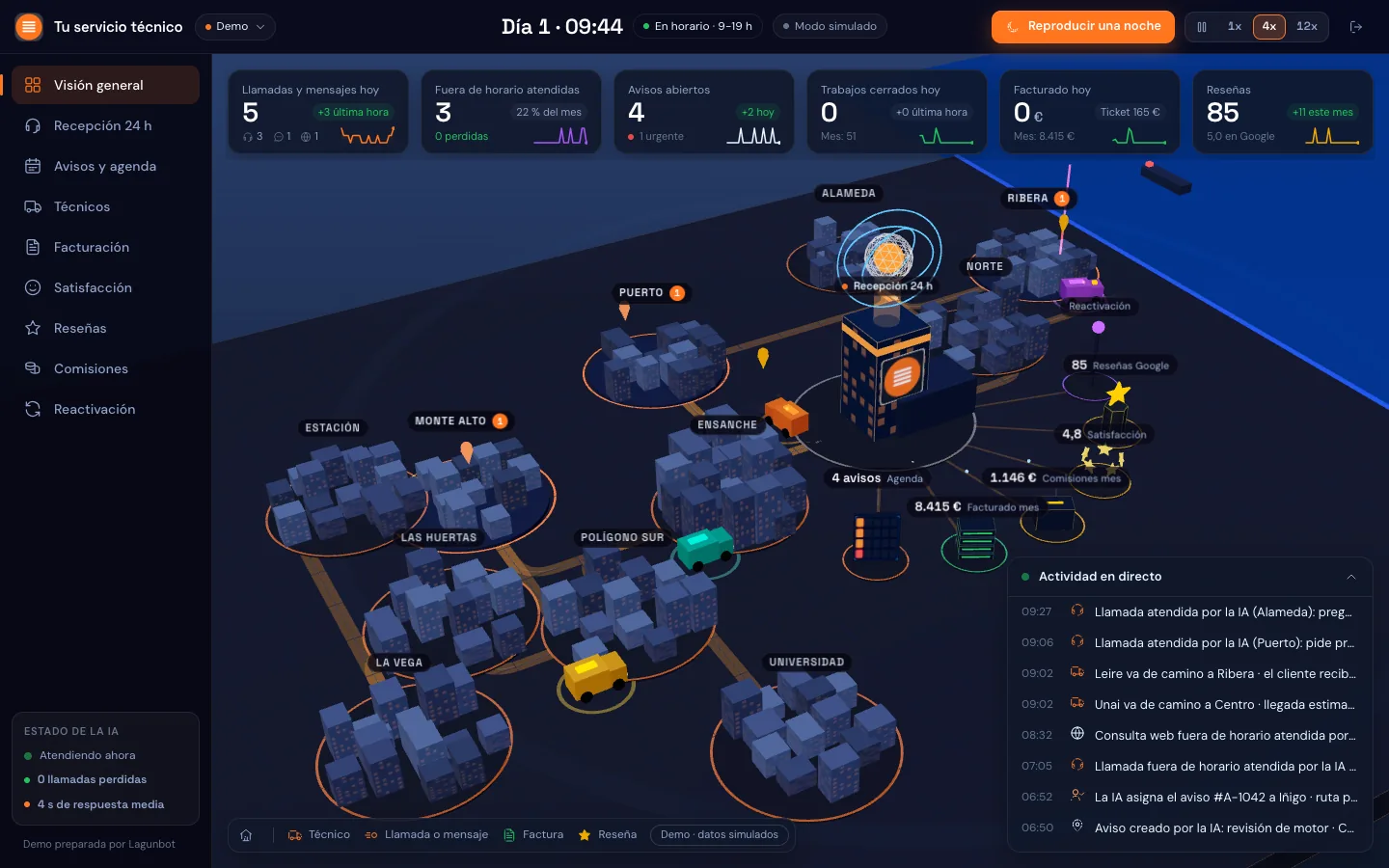
The hyperautomation example we know best is one we designed ourselves. We were asked to "automate the whole business" of a company that repairs and installs roller shutters, deals with its customers by phone and WhatsApp and has technicians who drive vans and are paid commission. The result was a modular plan and a prototype that works with fictitious data. It is not in production at any client, so we present it as a design.
This is what a day with it would look like:
- 22:40, a call out of hoursA local resident has a stuck shutter and rings when the office has already closed. The assistant answers in her language, asks what is wrong and whether it is urgent, gives her a price range and makes clear that the technician will confirm it before touching anything. It offers an appointment and asks for a photo over WhatsApp.
- 07:30, the technician's routeThe technician receives the day's route on their phone, with the photos customers have sent. On setting off for the customer's home they press "on my way" and she receives the alert.
- When the job is done, a voice noteThe technician describes in a voice note what they have done and the system creates the job sheet, works out the VAT that applies, issues the invoice in the invoicing program, records the technician's commission and marks the payment as received.
- Two hours later, the surveyThe customer receives a one-question survey and the link to leave a review. If she gives a low score, the manager receives an alert within minutes so they can call her and put things right.
- 19:00, summary for the ownerA message with what was done during the day, what is still pending and what needs a decision from them.
- End of monthThe system calculates the commission settlement and prepares the Excel file for the accountancy firm.
- A year laterThe customer receives a reminder to have the installation checked.
Behind every step there are design decisions:
- We do not issue invoices from a program of our own. The invoice comes from an invoicing program that complies with the regulations (VeriFactu in Spain's common-regime territory, TicketBAI in the Basque Country); we connect it and send the invoice by WhatsApp or email.
- The assistant says from the first message that it is a virtual assistant, as article 50 of the EU AI Act requires, and it also builds trust.
- It only promises "we are coming now" if a technician is on call. What counts as urgent is decided by the owner, not the AI.
- Without seeing the fault there is no fixed price: a range is given and the technician confirms it.
- Voice is a separate module that has to be tested first: call forwarding, the quality of the language and how long it takes to answer. Chat support relies on WhatsApp, and voice support on a voice agent.
One brain, many channels
The idea behind the plan is a single brain for many brands and many channels. It is organised in three blocks:
| Block | What it contains |
|---|---|
| Inputs | Phone, WhatsApp and web. Everything ends up in the same core. |
| Core | Jobs, customers, rates by brand and by area, technicians, VAT and commission rules. |
| Outputs | The technician, the invoicing program, the customer, Google, the owner and the accountancy firm. |
Thanks to the core, a phone call, a WhatsApp message and a web form generate the same kind of job. To add a brand, you only need to enter its rates in the core, without redoing the rest.
Part of the system reuses pieces we already had. The quoting engine and the PDFs come from Lagunbot Presupuestos, the software we built for aluminium and PVC joinery firms. The fault reports, the recurring customers on WhatsApp, the internal assistant, the fleet schedule from the transport version and the daily summary also come from earlier projects.
If the owner's dashboard interests you, our article on the business dashboard describes the dashboards we use to run Lagunbot.
Universal modules and trade-specific modules
If you take the shutter system apart into modules, most of them have nothing to do with shutters, and that is what interests us most about the design.
These modules suit almost any business:
- An AI receptionist by chat (WhatsApp and web) and by voice, which also answers out of hours.
- Quotes: a request comes in, it is priced with the business's rates and a document comes out ready for review.
- Payment and invoicing, connected to the invoicing program the company already uses.
- A survey after the service and review and reputation management.
- Owner's dashboard and daily summary.
- Reactivation of former customers, always with their permission.
- An internal copilot you can ask about the company's data.
These others depend on the trade:
- The rate card: for shutters, typical faults, surcharges and areas; in another trade it might be hours and consumables.
- Technician dispatch and van routes.
- The job sheet.
- Commissions.
- VAT rules specific to the sector.
That is why the shutter system can be carried over to another business by changing the trade-specific modules and leaving the rest almost as it is. The reusable part is already thought out; the trade-specific part is built for each company, and that is what our custom software development page is about.
What changes depending on the business
This is how the same system would be adapted to other businesses. They are possible adaptations that we have not built.
| Business | Stays the same | The module that changes |
|---|---|---|
| Field service or installation company (boilers, lifts, alarms) | AI receptionist, payment and invoicing, reviews, dashboard and summary | Technician routes, job sheet with photos or voice note, rate by fault and area, maintenance contracts |
| Clinic | Chat and voice support, reminders, survey, dashboard | Diary by practitioner and treatment room, absence notices, privacy rules for health data |
| Academy | Receptionist, reactivation of former students, payment, dashboard | Enrolments, groups and timetables, places per course, monthly fee receipts |
| Hotel | Guest support in several languages, reviews, daily summary | Bookings and availability, seasonal rates, alerts to reception and housekeeping |
| Industrial distributor | Handling enquiries, quotes, payment and invoicing, dashboard | Technical catalogue and part references, orders and delivery notes, delivery status, delivery routes |
| Renovation company | Receptionist, quotes, reviews, reactivation, dashboard | Preliminary visit and measurements, itemised quote, tracking of the works, staged payments |
Advantages and disadvantages of hyperautomation
| Advantages | Disadvantages |
|---|---|
| Less data copied by hand, and therefore fewer transcription errors. | The system has to be designed as a whole, and that takes more preparatory work than automating a single task. |
| Service at any hour, without the team having to keep watch. | It depends on the current programs being connectable. Some have no API, or charge extra for it. |
| A single data core: a rate or a rule is changed once. | When a process is poorly defined, automating it only makes it go wrong faster. |
| The owner sees the whole business on a dashboard and in a daily summary. | The system has to be maintained: rates, rules and answers change, and someone in the company has to be responsible for that data. |
| It can grow module by module, building on what came before. | The AI can make mistakes. It needs limited permissions and a person to supervise. |
| There is a record of what was done, when and with what data. | The team needs time to trust the system. |
The problem of programs without an API can be solved. If the invoicing program has none, or charges for it separately, you work with its exports and the system is updated when the file is uploaded. It is less convenient than a direct connection, but it works: that is how we update our own invoicing dashboard.
What not to automate
There are things we prefer to leave in people's hands:
- Decisions with consequences, such as a discount outside the rate card, compensation or a dismissal. The AI can prepare the case, but a person decides.
- Delicate complaints and genuine emergencies, which have to reach someone as quickly as possible.
- Processes nobody can describe. If every salesperson quotes in their own way, you first need to agree how it is done.
- Rigged reviews. Asking for a review only from customers who give a high score, or giving something in return, goes against the Google Maps review policy. The link goes to every customer, and a low score triggers a call to repair the relationship.
- Employment and tax matters. Whether the technicians are employees or self-employed, or how payroll is done, is for the accountancy firm to decide; the system calculates and exports.
A useful rule: the harder an action is to undo, the closer someone on the team needs to be. That is why we always start with the system proposing and a person confirming, and only switch to automatic once we have seen that it works.
If an AI assistant serves customers, it has to say so from the start. Article 50 of Regulation (EU) 2024/1689 requires people to be told that they are interacting with an AI system, unless that is obvious from the context.
How to start with one module
We recommend moving forward module by module, with the design of the whole done from the beginning so that each piece fits with the next.
- Map the journeyWrite down how a request travels today from the moment it comes in until it is paid, and mark where time is lost, data is copied or something is forgotten.
- Choose the first moduleThe one that hurts most and depends least on others. In many companies it is out-of-hours support or quotes.
- Define the coreWhat data the business has (customers, jobs, rates) and where it is kept. It is the part you see least and the one that pays off most when done well.
- Connect what already existsReview which programs are used and how they connect, by API or by export.
- Start with supervisionAt first, a person reviews each proposal from the system before it is applied.
- Measure with the company's own figuresNote how the process worked before and compare it with what happens afterwards.
- Add the next moduleOnce the core is built, each new module builds on the previous ones.
At Lagunbot the process is this: a free 30-minute assessment by video call, a tailored written proposal, a phased build and maintenance. If what you need is an assistant that carries out tasks, see AI agents for business. To decide where to start there is our AI consulting.
Let's see which modules of your business can be connected
In 30 minutes we go through how work comes into your company, which programs you use and where it makes sense to start. It is free and there is no obligation.
Request an assessment →Frequently asked questions about hyperautomation
What is hyperautomation in simple terms?
It is automating a business from end to end, with several technologies working together. A request goes through the whole process, from customer service to the invoice and the review, without anyone copying data by hand, and a person supervises what matters.
What is the difference between automation and hyperautomation?
Automation solves one specific step, such as sending a reminder. Hyperautomation connects all the steps on a common data core, uses AI for the cases that do not follow fixed rules and gives an overview of the business.
Is hyperautomation only for large companies?
No. The term sounds like something for big corporations, but the method works for a small business: you start with one module and extend it. You need someone who knows the process and reviews what the system does.
What technologies does hyperautomation include?
Artificial intelligence, robotic process automation (RPA), integrations between programs, business rules and monitoring dashboards. In a small business, a conversational assistant, a data core, connections to the programs the company already uses and a dashboard are usually enough.
Is hyperautomation the same as RPA?
No. RPA is a robot that repeats fixed steps, such as copying data from one screen to another, and it can be one more piece of a hyperautomated system. On its own it breaks when a screen changes or an exception appears. Hyperautomation adds coordination between the pieces and an AI that deals with new cases.
What examples of hyperautomation are there?
In large companies the typical example is the process that runs from invoice to payment. In a small service business, the one in this article: job, technician, job sheet, invoice, payment, survey and review, with a daily summary for the owner. The same pattern can be adapted to clinics, academies, hotels or distributors by changing the modules specific to the trade.
Does it replace the people on the team?
No. It takes care of what repeats and leaves people what calls for judgement: emergencies, complaints, decisions and dealing with the customer. The team spends less time transcribing and forwarding, and more on reviewing cases and improving the service.
How much does it cost and how long does it take?
It depends on the modules, the channels, the languages and the programs it has to connect with, which is why we do not give a general figure. After the free 30-minute assessment we send a tailored written proposal, with the phases and what is delivered in each one.
Sources
- Gartner (press release, October 2019, Gartner IT Symposium/Xpo): Top 10 Strategic Technology Trends for 2020, hyperautomation section
- Network World (23 October 2019): Gartner top 10 strategic technology trends for 2020
- Camunda: Hyperautomation guide, which sets out Gartner's definition
- EUR-Lex: Regulation (EU) 2024/1689, the Artificial Intelligence Act (art. 50)
- Google: Maps user-generated content policy, prohibited and restricted content (manipulation of ratings)